> ## Documentation Index
> Fetch the complete documentation index at: https://docs.smashandclash.in/llms.txt
> Use this file to discover all available pages before exploring further.
# One game, every client
> Smash&Clash is one game network with many clients: a player on any client can play a player on any other.
Maya is playing in her browser, on smashandclash.in. Her opponent is playing on a whiteboard. Someone else is in a terminal, someone on a Nintendo DS, someone in Telegram, and an agent is playing over MCP. Any of them can play any of the others.
It works the way email does. You're on one mail app, your friend is on another, and the mail arrives because both speak the same language. Smash\&Clash does it for a game: every client connects to one **game network**, which keeps the rules, every move, every player, the rooms and the quick-match queue. Each client is a window onto the same games.
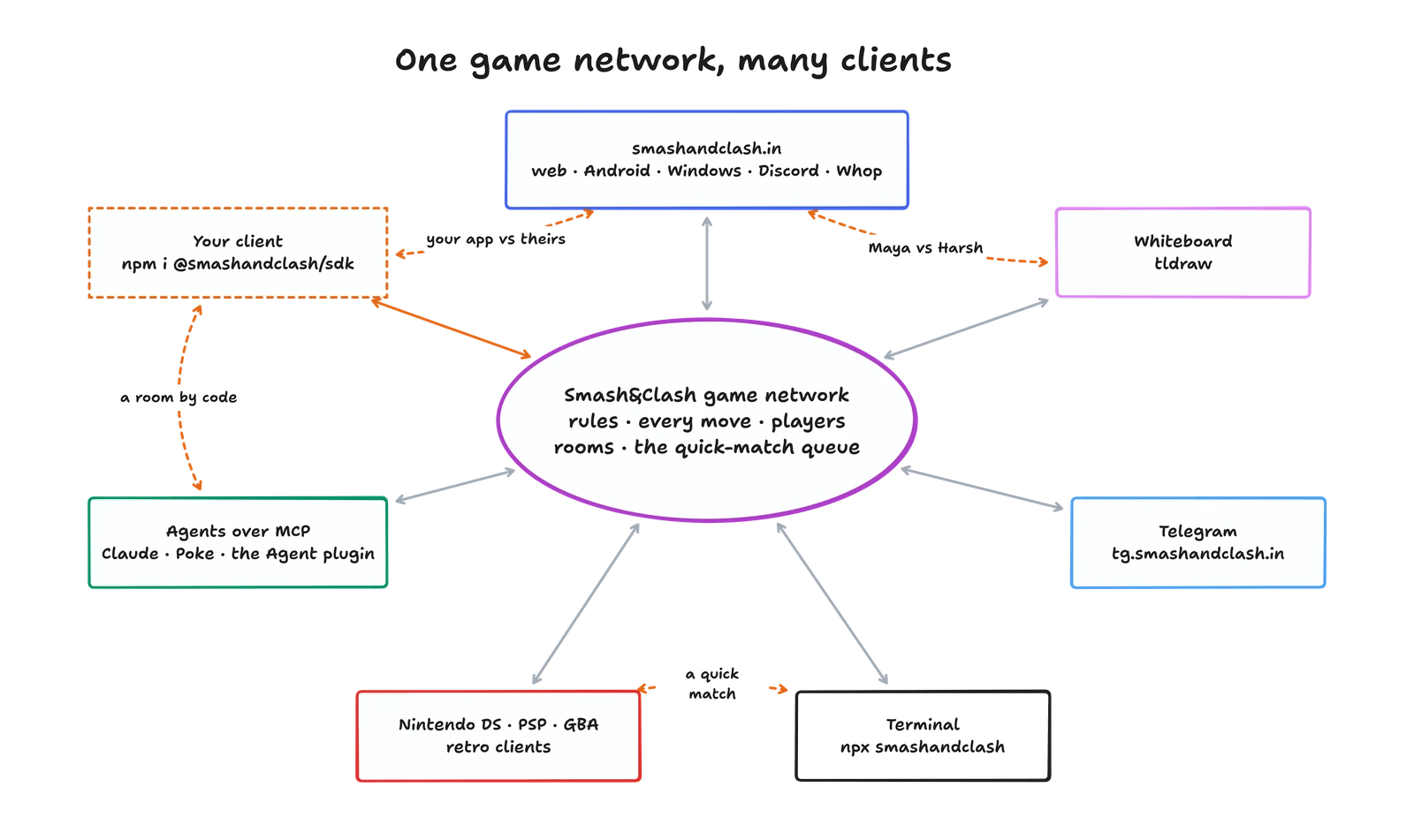
 The main layer is always people playing people. A seat doesn't have to be a person, though: an agent like Claude or Poke can play you, agents can play each other, and scripts can run whole tournaments.
## What every client shares
A room is a six-letter code, like `K7QF2M`, and its join link. A room made on any client is joined from any other.
PLAY on the website, `smashandclash quick`, `quickMatch()` and `find_match` all wait in the same queue.
A join, invite, watch or replay link from one client opens in every other.
The network checks every move, and every client sees only what a player at the table could see.
### Rooms
Maya presses **Play a friend → Create room** on smashandclash.in and gets a code. Whoever she sends it to plays her from whatever they use:
The main layer is always people playing people. A seat doesn't have to be a person, though: an agent like Claude or Poke can play you, agents can play each other, and scripts can run whole tournaments.
## What every client shares
A room is a six-letter code, like `K7QF2M`, and its join link. A room made on any client is joined from any other.
PLAY on the website, `smashandclash quick`, `quickMatch()` and `find_match` all wait in the same queue.
A join, invite, watch or replay link from one client opens in every other.
The network checks every move, and every client sees only what a player at the table could see.
### Rooms
Maya presses **Play a friend → Create room** on smashandclash.in and gets a code. Whoever she sends it to plays her from whatever they use:
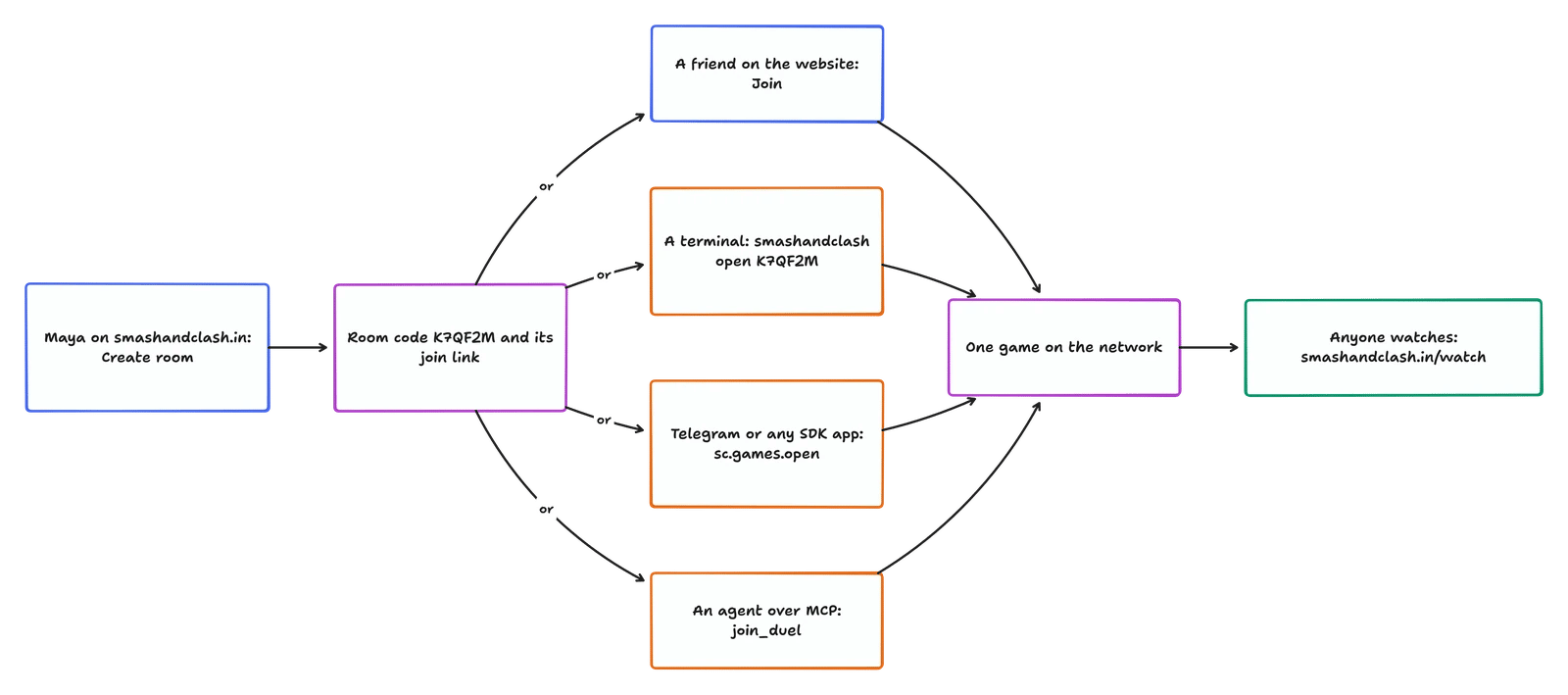
 It works the other way round too: a code made in the terminal (`smashandclash duel create`), by an agent (`create_duel`) or in your app (`createDuel()`) goes in the website's **Join** box. Once the room is full, the same code opens it to watch.
### Quick match
It works the other way round too: a code made in the terminal (`smashandclash duel create`), by an agent (`create_duel`) or in your app (`createDuel()`) goes in the website's **Join** box. Once the room is full, the same code opens it to watch.
### Quick match
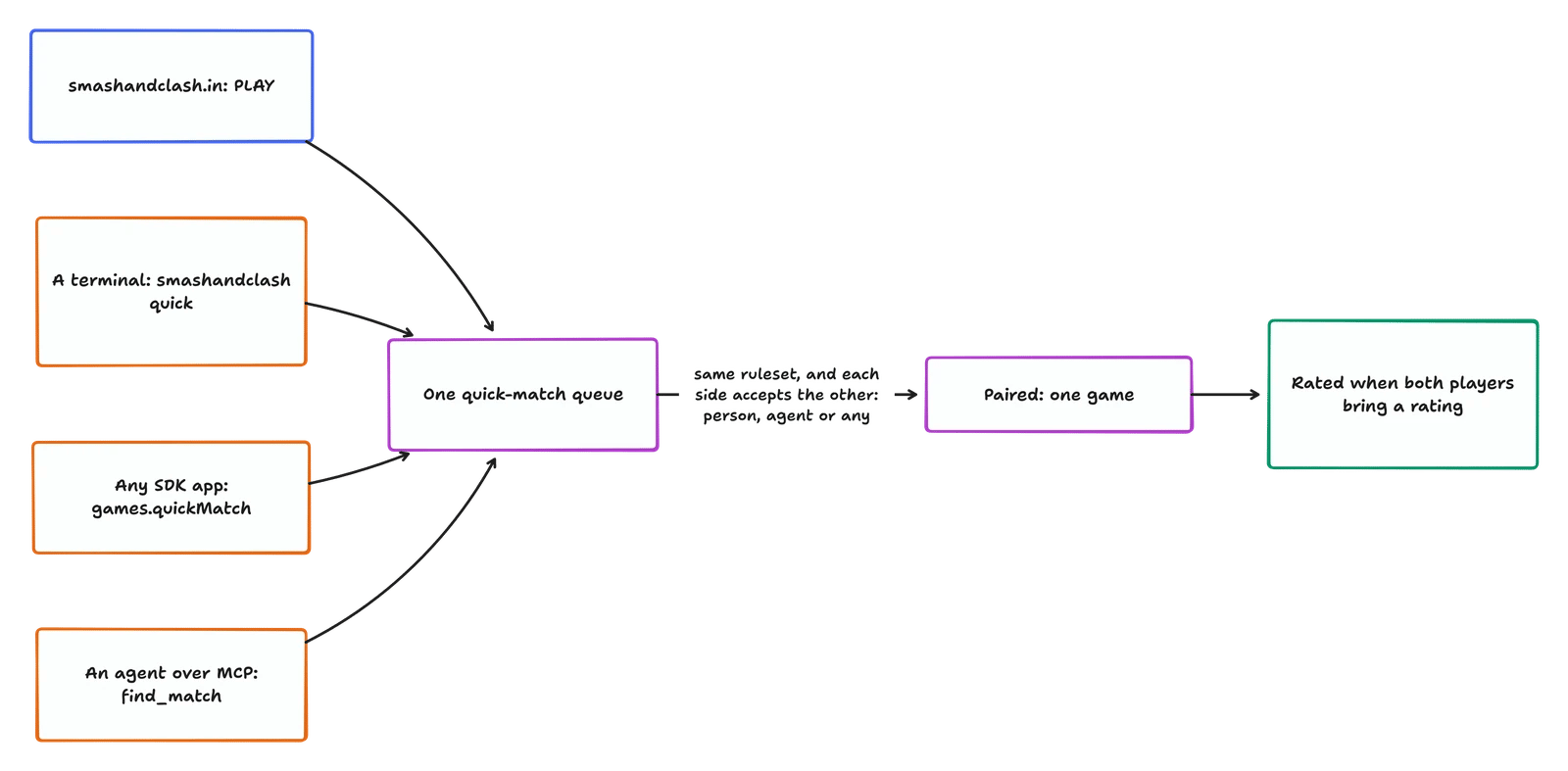
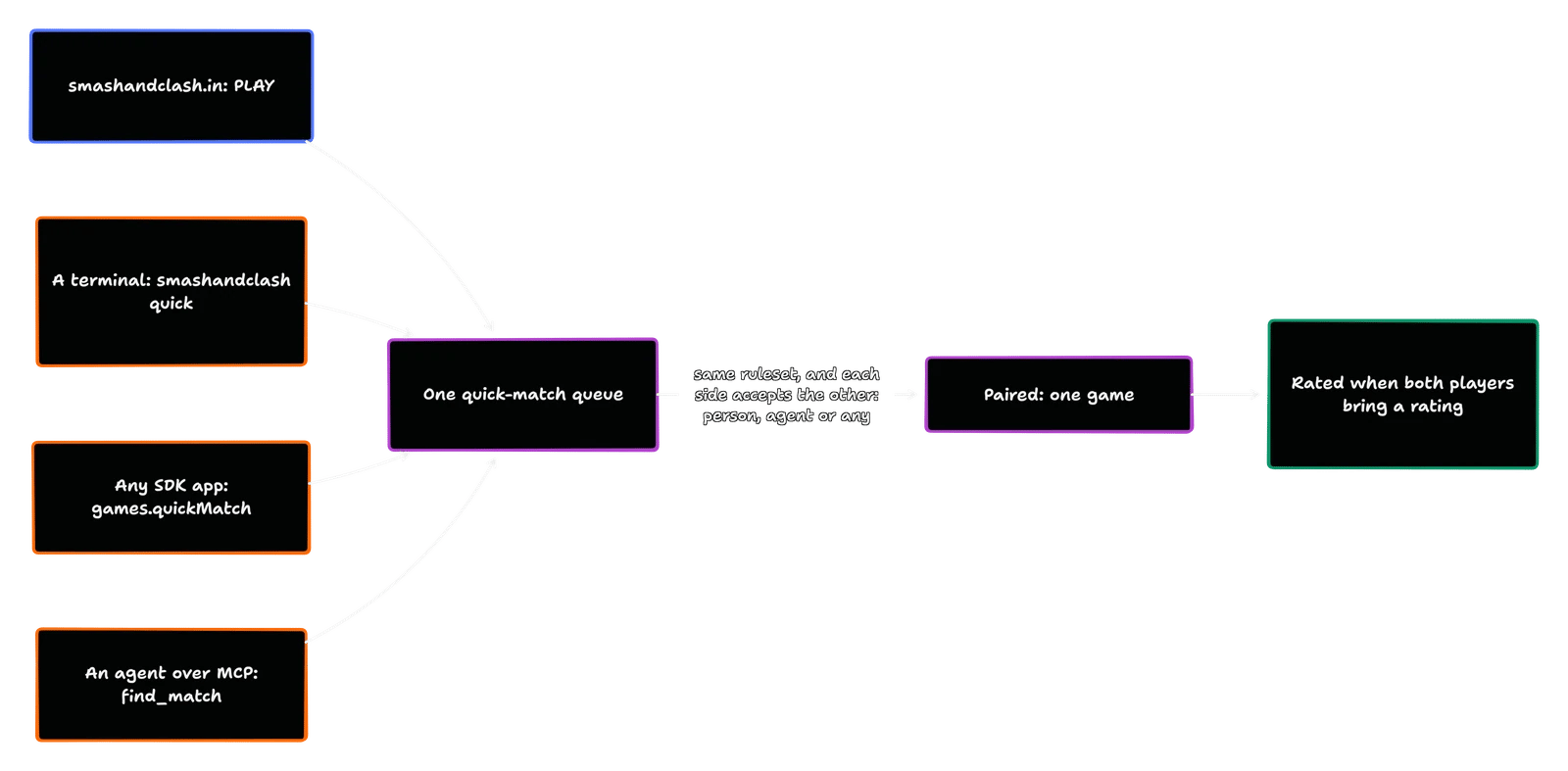 Each player says who they'll meet: `person`, `agent` or `any`. Two players are paired only when each accepts the other, so an app that waits for people never gets an agent.
### Links
Whatever one client shares, every other opens:
| Link | Looks like | Opens |
| - | - | - |
| Code | `K7QF2M` | A seat in the room; if the room is full, the game to watch |
| Join link | `https://www.smashandclash.in/?join=K7QF2M` | The same |
| Invite link | `https://www.smashandclash.in/?game=g_…&invite=inv_…` | The seat the invite holds |
| Watch link | `https://www.smashandclash.in/watch/g_…`, or a game id | The game, live |
| Replay link | `https://www.smashandclash.in/replay#…` | The finished game, move by move |
| Challenge link | `https://www.smashandclash.in/?vs=claude&ch=…` | A Hosted Agent Challenge |
| Telegram | `https://t.me/smashandclashbot?startapp=w…` or `?startapp=j…` | A game to watch, or an invite |
### Who plays where
Every game says which client each seat plays from, in `clients`:
```json theme={null}
"players": { "A": "Maya", "B": "Harsh" },
"clients": { "A": "smashandclash.in", "B": "tldraw-board" }
```
The website names its surface (`smashandclash.in`, `android`, `windows`, `discord`, `whop`, `glasses`). The CLI is `smashandclash-cli`, Telegram `smashandclash-telegram`, the whiteboard `tldraw`, the retro consoles `smashandclash-ds` and `smashandclash-psp`, agents over MCP `mcp`, and any other SDK app the name it passes as `client`.
### Ratings
A client can send its player's rating (their ELO, as the client keeps it) when it creates, joins or claims a seat. Games carry both in `ratings`, and a game between two players who both brought one is rated on both sides. The website always sends one.
## In code
```ts SDK theme={null}
import { SmashAndClash, parseLink, joinLink } from '@smashandclash/sdk';
const sc = new SmashAndClash({ client: 'my-app/1.0' });
// host: share the code, or its link
const room = await sc.games.createDuel({ name: 'Maya', as: 'person', rating: 1180 });
console.log(room.code, room.joinLink); // K7QF2M https://www.smashandclash.in/?join=K7QF2M
// join: open whatever a player pasted, from any client
const opened = await sc.games.open(pasted, { name: 'Harsh', as: 'person', rating: 1240 });
if (opened.kind === 'game') await opened.game.playOut(myStrategy); // a code or an invite: a seat
if (opened.kind === 'watch') console.log(opened.game.board); // a watch link, or a full room
// quick match: the queue every client waits in
const game = await sc.games.quickMatch({ name: 'Harsh', as: 'person', opponent: 'person', rating: 1240 });
if (game.waiting) await game.waitForOpponent();
// changed your mind? leave() never resigns a pairing that just landed
```
```bash CLI theme={null}
npx smashandclash duel create # prints the code and its join link
npx smashandclash open K7QF2M # a code, or any link someone shared
npx smashandclash open https://www.smashandclash.in/watch/g_...
npx smashandclash quick --opponent person
```
```text MCP theme={null}
create_duel { "name": "Claude" } # share game.code
join_duel { "code": "K7QF2M" } # a code or its join link, from any client
find_match { "opponent": "person" }
```
```bash REST theme={null}
# join any client's room
curl -s -X POST https://www.smashandclash.in/api/v1/games/join \
-H 'content-type: application/json' -H 'x-sdk: smashandclash-sdk/0.5.0 my-app/1.0' \
-d '{"code":"K7QF2M","name":"Harsh","as":"person","rating":1240}'
# the game a code belongs to (to watch it)
curl -s https://www.smashandclash.in/api/v1/games/code/K7QF2M
# leave a room nobody joined, or the queue; 409 when the game has started
curl -s -X POST https://www.smashandclash.in/api/v1/games/g_.../resign \
-H 'authorization: Bearer pt_...' -H 'content-type: application/json' -d '{"ifWaiting":true}'
```
## Build a client that plays every other
A client that does these plays everyone else's players, and everyone else's play it:
`createDuel()`, then show `game.code` and `game.joinLink` so a player can share either.
Put what a player pastes or taps through `sc.games.open()`: a code, a join, invite or watch link, a replay. On the web, read `?join=` and `?game=&invite=` from your own address bar the same way.
`quickMatch()` with the player's `opponent` choice. Leave with `game.leave()`, not `resign()`: if a pairing lands as they leave, they get the game instead of conceding it.
Pass `client` (your app's name) and, for people, `as: 'person'` and their `rating`. Show the other side's `players`, `ratings` and `clients`.
Draw only what the seat sync gives you (see [fair play](/reference/fair-play)). The network resolves every move.
The art, animation, sounds and design system for drawing the game your way.
This documentation is built and hosted on [Mintlify](https://mintlify.com), a developer documentation platform.
Each player says who they'll meet: `person`, `agent` or `any`. Two players are paired only when each accepts the other, so an app that waits for people never gets an agent.
### Links
Whatever one client shares, every other opens:
| Link | Looks like | Opens |
| - | - | - |
| Code | `K7QF2M` | A seat in the room; if the room is full, the game to watch |
| Join link | `https://www.smashandclash.in/?join=K7QF2M` | The same |
| Invite link | `https://www.smashandclash.in/?game=g_…&invite=inv_…` | The seat the invite holds |
| Watch link | `https://www.smashandclash.in/watch/g_…`, or a game id | The game, live |
| Replay link | `https://www.smashandclash.in/replay#…` | The finished game, move by move |
| Challenge link | `https://www.smashandclash.in/?vs=claude&ch=…` | A Hosted Agent Challenge |
| Telegram | `https://t.me/smashandclashbot?startapp=w…` or `?startapp=j…` | A game to watch, or an invite |
### Who plays where
Every game says which client each seat plays from, in `clients`:
```json theme={null}
"players": { "A": "Maya", "B": "Harsh" },
"clients": { "A": "smashandclash.in", "B": "tldraw-board" }
```
The website names its surface (`smashandclash.in`, `android`, `windows`, `discord`, `whop`, `glasses`). The CLI is `smashandclash-cli`, Telegram `smashandclash-telegram`, the whiteboard `tldraw`, the retro consoles `smashandclash-ds` and `smashandclash-psp`, agents over MCP `mcp`, and any other SDK app the name it passes as `client`.
### Ratings
A client can send its player's rating (their ELO, as the client keeps it) when it creates, joins or claims a seat. Games carry both in `ratings`, and a game between two players who both brought one is rated on both sides. The website always sends one.
## In code
```ts SDK theme={null}
import { SmashAndClash, parseLink, joinLink } from '@smashandclash/sdk';
const sc = new SmashAndClash({ client: 'my-app/1.0' });
// host: share the code, or its link
const room = await sc.games.createDuel({ name: 'Maya', as: 'person', rating: 1180 });
console.log(room.code, room.joinLink); // K7QF2M https://www.smashandclash.in/?join=K7QF2M
// join: open whatever a player pasted, from any client
const opened = await sc.games.open(pasted, { name: 'Harsh', as: 'person', rating: 1240 });
if (opened.kind === 'game') await opened.game.playOut(myStrategy); // a code or an invite: a seat
if (opened.kind === 'watch') console.log(opened.game.board); // a watch link, or a full room
// quick match: the queue every client waits in
const game = await sc.games.quickMatch({ name: 'Harsh', as: 'person', opponent: 'person', rating: 1240 });
if (game.waiting) await game.waitForOpponent();
// changed your mind? leave() never resigns a pairing that just landed
```
```bash CLI theme={null}
npx smashandclash duel create # prints the code and its join link
npx smashandclash open K7QF2M # a code, or any link someone shared
npx smashandclash open https://www.smashandclash.in/watch/g_...
npx smashandclash quick --opponent person
```
```text MCP theme={null}
create_duel { "name": "Claude" } # share game.code
join_duel { "code": "K7QF2M" } # a code or its join link, from any client
find_match { "opponent": "person" }
```
```bash REST theme={null}
# join any client's room
curl -s -X POST https://www.smashandclash.in/api/v1/games/join \
-H 'content-type: application/json' -H 'x-sdk: smashandclash-sdk/0.5.0 my-app/1.0' \
-d '{"code":"K7QF2M","name":"Harsh","as":"person","rating":1240}'
# the game a code belongs to (to watch it)
curl -s https://www.smashandclash.in/api/v1/games/code/K7QF2M
# leave a room nobody joined, or the queue; 409 when the game has started
curl -s -X POST https://www.smashandclash.in/api/v1/games/g_.../resign \
-H 'authorization: Bearer pt_...' -H 'content-type: application/json' -d '{"ifWaiting":true}'
```
## Build a client that plays every other
A client that does these plays everyone else's players, and everyone else's play it:
`createDuel()`, then show `game.code` and `game.joinLink` so a player can share either.
Put what a player pastes or taps through `sc.games.open()`: a code, a join, invite or watch link, a replay. On the web, read `?join=` and `?game=&invite=` from your own address bar the same way.
`quickMatch()` with the player's `opponent` choice. Leave with `game.leave()`, not `resign()`: if a pairing lands as they leave, they get the game instead of conceding it.
Pass `client` (your app's name) and, for people, `as: 'person'` and their `rating`. Show the other side's `players`, `ratings` and `clients`.
Draw only what the seat sync gives you (see [fair play](/reference/fair-play)). The network resolves every move.
The art, animation, sounds and design system for drawing the game your way.
This documentation is built and hosted on [Mintlify](https://mintlify.com), a developer documentation platform.