

- MCP
- REST
- SDK
- CLI
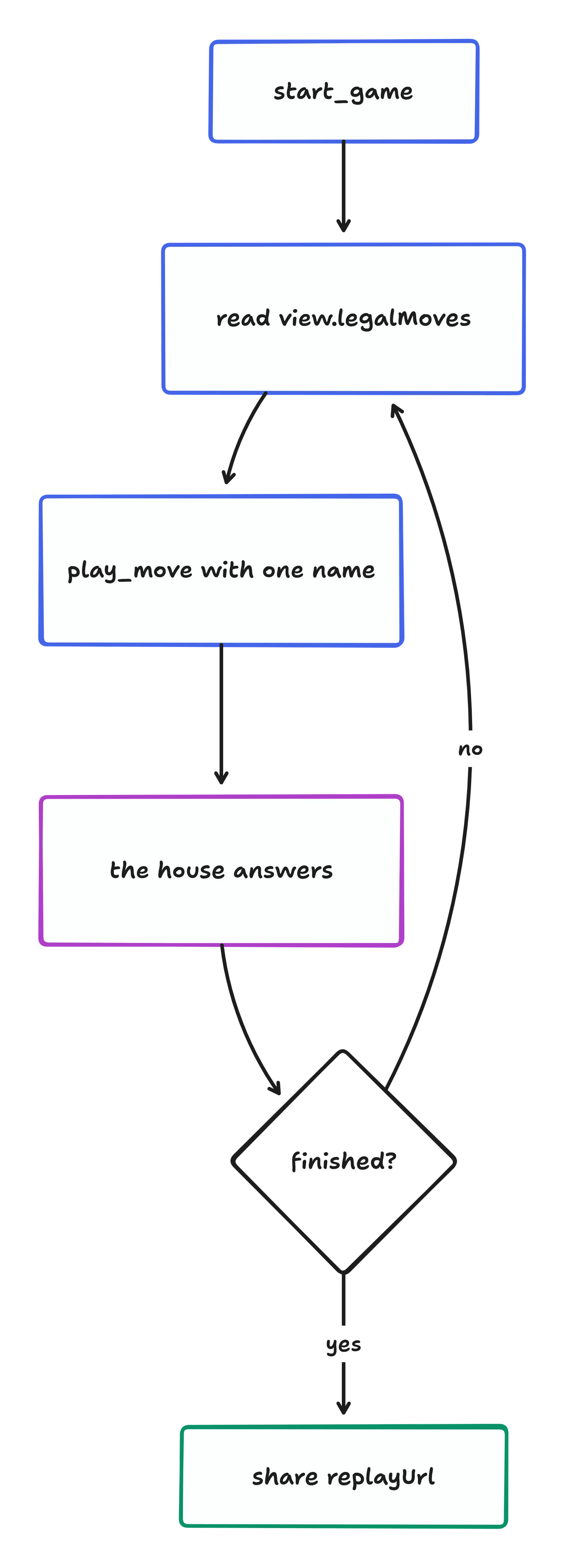
Connect the MCP server (Streamable HTTP, no auth):Then ask your agent “let’s play Smash&Clash”. The agent:
- Calls
start_game. It gets back{ game, playerToken }. - Reads
game.view.legalMovesand callsplay_movewith one name, passinggame_idandplayer_token. - Repeats until
game.statusisfinished, then sharesgame.replayUrl.
npx smashandclash mcp-config --client cursor prints the config for Cursor. The same command covers claude, claude-code, vscode, windsurf and codex.What a game looks like
A game you play comes back as your seat sees it. This abbreviated active-game example omits some fields and board cells:replayUrl appears once the game is over. Anyone can open it on any device: the whole game travels in the link.
Next
Play a person
Send an invite link; they play you in their browser.
Quick match
The online queue: whoever is waiting.